Cambridge 9618 Pseudocode: String Manipulation, File Handling, Records and Arrays Explained | Class 6
- H1: Cambridge 9618 Pseudocode: String Manipulation, File Handling, Records and Arrays Explained
- H2: Why String-Processing Questions Matter in Cambridge 9618
- H2: Understanding the Delimited Student Data Problem
- H3: What Is a Delimiter?
- H2: LEFT, MID and LENGTH in Cambridge Pseudocode
- H3: Why MID Is Useful for Character-by-Character Processing
- H2: How to Traverse an Entire String
- H2: Finding a Comma Inside a String
- H3: Saving the Comma Position
- H2: FOR vs WHILE for Searching a String
- H3: Why the WHILE Solution Is More Efficient
- H2: Extracting Everything Before the Comma
- H2: Extracting Everything After the Comma
- H3: Handling One-, Two- and Three-Digit Values
- H2: Reading Student Data From a File
- H2: Understanding Records in Cambridge 9618
- H2: Creating an Array of Student Records
- H3: Don't Confuse the Comma Index With the Array Index
- H2: A Repeatable Strategy for Exam Questions
- H2: Conclusion and Cambridge 9618 Pseudocode FAQs
Cambridge 9618 Pseudocode: String Manipulation, File Handling, Records and Arrays Explained
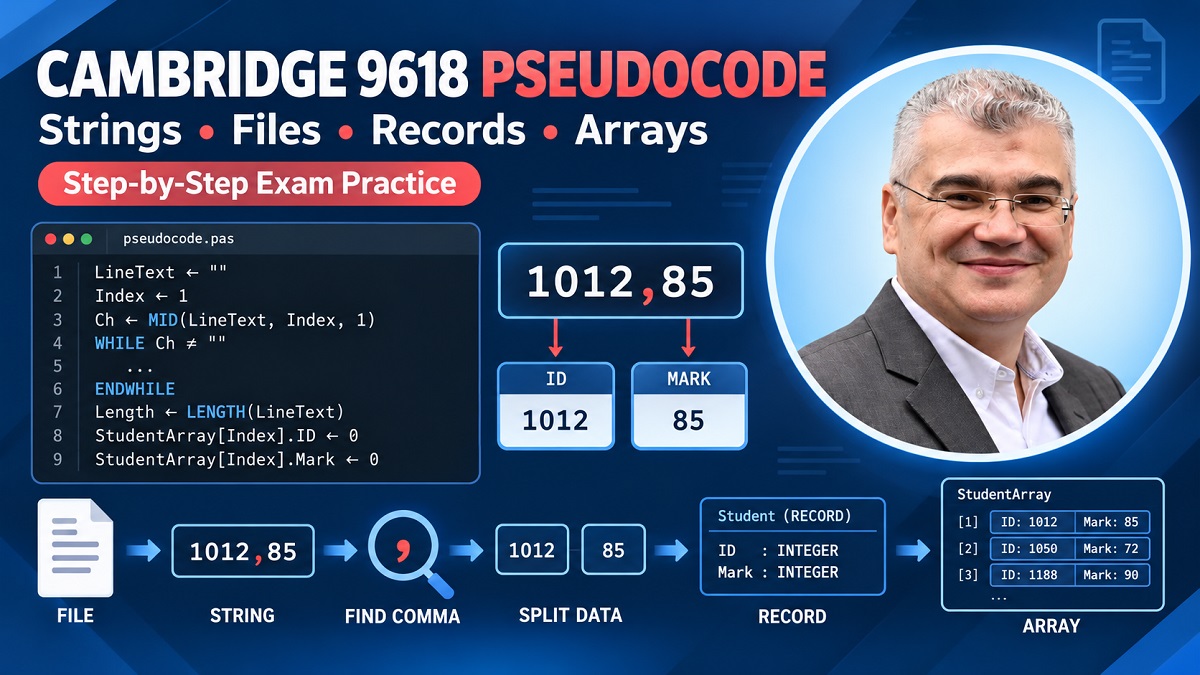
A line as simple as 1012,85 doesn't look particularly intimidating. It's just a few numbers and a comma. Yet in a Cambridge 9618 Computer Science pseudocode question, that tiny string can test an impressive collection of skills at the same time. You may need to traverse the string, locate the comma, separate the two pieces of information, handle strings of different lengths, read multiple lines from a file and eventually store everything inside an array of records. That's exactly why this type of question is such useful practice: it forces several individual programming concepts to work together rather than testing them in isolation.
The tutoring session behind this guide develops that problem progressively. It begins by reviewing string operations such as MID, LEFT and LENGTH, then asks how a program could examine every character in a string. From there, the problem changes from simply traversing the string to searching for a comma delimiter. Once its position is known, the program can extract the information on either side. The lesson then expands the same idea into file processing, where different lines contain student IDs and marks that need to be separated and stored.
The interesting part isn't any single pseudocode statement. It's seeing how each idea becomes a building block for the next one. Once you can locate a delimiter, you can split a record. Once you can split a record, you can process a file containing many records. Once you can process those records, you can store them in a structured data type.
That's the pattern we'll unpack.
Why String-Processing Questions Matter in Cambridge 9618
String-processing questions can expose whether you genuinely understand variables, indexes and loops. It's relatively easy to look at MID(MyString, 4, 1) and explain what it does. It's considerably harder to design a loop where that starting position changes automatically until the program discovers a particular character. The difference is similar to recognizing the route on a map versus navigating it yourself: one requires recognition, while the other requires you to make the decisions.
During the lesson, the first objective isn't even to locate the comma. The student is initially asked to build a loop capable of moving through every character of the string. That distinction matters. Before searching for something, you need a reliable mechanism for looking at each possible position. The transcript deliberately separates those two problems so the search condition can be added only after the traversal itself makes sense.
This is a useful approach to Cambridge exam questions in general. If a large problem feels confusing, strip away its final objective temporarily. Ask yourself what basic mechanism you need first. Do you need to traverse a string? Read a file? Process an array? Locate a delimiter? Once that foundation works, add the next requirement.
A complicated pseudocode question often isn't one difficult problem. It's four or five small problems stacked together.
Understanding the Delimited Student Data Problem
The central example involves information placed together on one line and separated by a comma. Later in the lesson, this represents a student identifier and a mark. The program eventually needs to separate those pieces of information and store them appropriately. The transcript then expands this into multiple lines read from a file, meaning the same algorithm needs to work repeatedly rather than for one hard-coded example.
Imagine records such as:
1012,85
1011,100
1045,7
Humans immediately see two pieces of information on each line. The computer doesn't automatically interpret them that way. Initially, each line can simply be treated as one string.
Your algorithm therefore needs to discover where the first piece ends and the second begins.
That's the comma's job.
What Is a Delimiter?
A delimiter is a character or sequence used to separate pieces of data.
In:
1012,85
the comma separates:
1012
from:
85
That comma therefore provides the boundary the algorithm needs.
This sounds trivial until the data changes. What if the ID has a different length? What if the score is 7 instead of 85? What if it's 100?
Hard-coded positions quickly fall apart.
Searching for the delimiter creates a much more flexible algorithm because the data itself tells the program where the boundary is.
LEFT, MID and LENGTH in Cambridge Pseudocode
Three string operations form an important part of this lesson: LEFT, MID and LENGTH.
LEFT is useful when you need characters beginning from the left side of a string. MID lets you extract characters beginning at a particular position, which makes it especially useful when an index is changing inside a loop. LENGTH gives you information about the total length of the string, allowing the algorithm to work with data whose size isn't fixed.
The transcript uses these ideas to distinguish between retrieving a fixed number of characters from the left and accessing a particular character as an index moves through the string.
That last part is crucial.
Suppose you always extract the character at position 1. Putting that expression inside a six-iteration loop doesn't magically make it examine six different characters. You'll retrieve the first character six times.
The position itself needs to change.
Why MID Is Useful for Character-by-Character Processing
Conceptually, you want something resembling:
MID(S, Index, 1)
The important element isn't simply MID.
It's Index.
On the first iteration, Index might be 1. On the next, it becomes 2, then 3, then 4. The same expression can therefore inspect a different character on every iteration.
This is the bridge between string functions and loops.
Once you understand it, searching for a comma becomes much easier.
How to Traverse an Entire String
Suppose your only objective is to output every character.
You know the beginning position. What you may not know is how long the particular string will be.
That's where LENGTH becomes useful.
Conceptually:
FOR Index ← 1 TO LENGTH(S)
    OUTPUT MID(S, Index, 1)
NEXT Index
The exact pseudocode should follow the conventions expected by the relevant Cambridge syllabus and question, but the algorithmic idea is straightforward.
The loop controls the position.
MID retrieves the character at that position.
LENGTH prevents you from assuming a fixed string size.
This was an important stepping stone in the tutoring session. Once the student recognized that the Index needed to become the starting position supplied to MID, the loop could move through different characters instead of repeatedly retrieving the first one.
Now the program can inspect everything.
The next challenge is making it care about what it finds.
Finding a Comma Inside a String
To search for a comma, each retrieved character needs to be compared with the delimiter.
Conceptually:
CurrentCharacter ← MID(S, Index, 1)

IF CurrentCharacter = "," THEN
    ...
ENDIF
Once the comparison succeeds, you know that Index represents the comma's position.
This transforms the index from a simple loop counter into meaningful information about the string.
Saving the Comma Position
One approach discussed in the session is storing the current index when the comma is found:
CommaPosition ← Index
That value can then be used later to extract data on either side of the delimiter.
Suppose the comma is at position 5.
Then conceptually:
Before comma: positions before 5.
After comma: positions beginning at 6.
That one number becomes the key to splitting the entire string.
FOR vs WHILE for Searching a String
Here's where the lesson becomes especially useful.
A FOR loop can traverse the whole string. If the goal is literally to process every character, that's perfectly reasonable.
But what if your only objective is to find the first comma?
Once you've found it, continuing to inspect every remaining character may be unnecessary.
The transcript explicitly revisits the initial solution for this reason. A FOR loop successfully searches the characters, but it continues even after the comma has been discovered. The lesson therefore considers a condition-controlled WHILE loop as a cleaner approach for this particular search.
Why the WHILE Solution Is More Efficient
The condition can represent exactly what the algorithm means:
Keep moving while the current character is not a comma.
Conceptually:
Index ← 1

WHILE MID(S, Index, 1) <> ","
    Index ← Index + 1
ENDWHILE
When the comma is finally reached, the condition becomes false and the loop stops.
Something elegant has happened here.
After the loop terminates, Index already represents the comma position. The separate CommaPosition variable used in the earlier approach may no longer be necessary.
The transcript explicitly highlights this simplification: selecting a loop whose condition matches the real problem can reduce the amount of code required.
Extracting Everything Before the Comma
Once the comma position is known, the left side becomes much easier to isolate.
If the delimiter occurs at Index, then everything before it ends at Index - 1.
Conceptually, this lends itself naturally to something like:
LEFT(S, Index - 1)
The transcript discusses both MID and LEFT as possibilities, noting that LEFT can conveniently retrieve everything to the left when the comma position is known.
The bigger lesson is to stop thinking in fixed numbers.
Don't say:
“The student ID is always the first four characters.”
unless the question guarantees that.
Instead, connect your extraction to the delimiter:
“The student ID consists of everything before the comma.”
That's a much more robust algorithmic description.
Extracting Everything After the Comma
The right side requires similar thinking.
The data begins immediately after the comma, so the starting position is related to:
CommaPosition + 1
But how many characters should be extracted?
That's where students can easily make an incorrect assumption.
Handling One-, Two- and Three-Digit Values
Suppose the mark is:
85
You might be tempted to extract exactly two characters.
Then another student receives:
100
Your algorithm breaks.
Or:
7
Again, a fixed two-character assumption doesn't represent the data correctly.
The lesson explicitly discusses this issue and explains why the extraction length should be calculated using the overall string length and comma position rather than assuming every mark has two digits.
This is an excellent general programming principle:
Avoid magic numbers when the program can calculate the correct value from the data.
Reading Student Data From a File
Once you can process one string, the problem becomes much more interesting.
What if a file contains many lines?
The transcript describes reading the student information line by line. Each iteration of the larger file-processing loop reads one line into a string. The comma-searching and splitting logic can then be applied to that current line. On the next iteration, another student's line is read and processed.
Conceptually:
WHILE NOT EOF(File)
    READFILE File, LineText

    // Find delimiter
    // Extract ID
    // Extract mark
    // Store student information
ENDWHILE
Notice the hierarchy.
There's a larger loop responsible for reading records from the file.
Inside that process, there's logic responsible for interpreting the current line.
Understanding which loop controls which task is essential. Otherwise, students can accidentally create unnecessary loops or use one index for two unrelated purposes.
Understanding Records in Cambridge 9618
Why introduce a record at all?
Because a student isn't represented by only one value.
The example associates an ID with a mark. Those two values describe the same student, so grouping them into a record provides a meaningful structure.
Conceptually:
TYPE StudentRecord
    DECLARE ID : STRING
    DECLARE Mark : INTEGER
ENDTYPE
The transcript specifically discusses the distinction between the record definition and an array containing student records. Each record holds related information, and the array allows many such records to be stored.
Think of the record as a form.
Every form has boxes for ID and mark.
The array is the filing cabinet holding many completed forms.
Creating an Array of Student Records
Once a StudentRecord structure exists, the program can conceptually maintain something like:
StudentArray[1:50]
Each position isn't merely one integer or string.
It's a complete student record.
That means you can conceptually address individual fields:
StudentArray[StudentIndex].ID
StudentArray[StudentIndex].Mark
This is where string processing, file handling, records and arrays finally meet.
A line comes from the file.
The delimiter is located.
The line is split.
The resulting pieces are assigned to fields of a record inside the array.
Then the program advances to the next student.
Don't Confuse the Comma Index With the Array Index
This is perhaps one of the most valuable mistakes explored in the session.
The string index used to locate the comma and the array index used to decide which student record you're filling have completely different jobs.
If the comma happens to occur at position 5, that doesn't mean the current student's data belongs in StudentArray[5].
The transcript explicitly walks through what would go wrong: repeatedly using the comma position as the student-array position could cause data to be placed in the wrong location or overwritten when subsequent records have their comma in the same position.
Keep the roles mentally separate:
String index → Where is the comma?
Student/record index → Which array position am I filling?
Two integers can contain the same number at some moment while representing completely different concepts.
Naming variables according to their purpose can make this much easier to see.
A Repeatable Strategy for Exam Questions
When you encounter a Cambridge 9618 problem involving a delimited file, don't try to write the whole answer in one burst.
Break it into stages:
Read → Search → Split → Convert if necessary → Store → Advance
First, determine how each line enters your program. Next, locate the delimiter. Then extract the pieces on either side. Consider their required data types. Store them in the correct fields and data structure. Finally, ensure that the correct record index advances before processing the next item.
You can also annotate the question before writing pseudocode:
Input: file containing student data
Line format: ID + comma + mark
Delimiter: comma
Output/storage: array of student records
Fields: ID and mark
Search requirement: find comma
Repeated process: one file line at a time
Suddenly the question stops looking like a wall of pseudocode.
It becomes a sequence of manageable decisions.
Conclusion and Cambridge 9618 Pseudocode FAQs
The most important lesson from this session isn't simply how to use MID or how to find a comma. It's how multiple programming concepts connect.
LENGTH helps your algorithm cope with varying strings. MID can retrieve the character at a changing position. A loop moves that position through the string. A condition lets you stop when the delimiter is found. The delimiter position allows you to split the string. File handling repeats that process for multiple records. Records group related fields, while an array allows many student records to be stored.
That's exactly the kind of connected thinking that makes unfamiliar pseudocode problems less intimidating.
1. Why use MID when searching a string?
MID can retrieve a character beginning at a specified position. When that position is controlled by an index variable, the program can examine different characters as the index changes.
2. Why not always use a FOR loop to find a comma?
A FOR loop can traverse the entire string, but if the objective is simply to find the first comma, a condition-controlled loop can stop when the delimiter is reached rather than continuing unnecessarily. This distinction is explicitly explored in the tutoring session.
3. Why shouldn't I assume a student mark has two digits?
Because valid data can have different lengths. The transcript gives the example of a mark such as 100, which requires three characters. Calculating the required substring length makes the solution more flexible.
4. What is an array of records?
A record groups related fields, such as a student's ID and mark. An array of records allows the program to store that structured information for many students.
5. What's the difference between the comma index and student array index?
The comma index tells you where the delimiter occurs inside the current string. The student array index tells you where the current student's record should be stored. They serve separate purposes and should not be confused.
Author Bio
Cambridge Computer Science Tutor Author Bio
Ahmed Elmalla is a Computer Science educator, Certified Cambridge International AS & A Level Computer Science (9618) teacher, and software engineer with over 20 years of teaching, software engineering, and international tutoring experience. He specializes in AP Computer Science A (Java) and Cambridge IGCSE (0478) and AS & A Level Computer Science (9618), helping students build strong programming, computational thinking, and exam-solving skills. Through his Learn with Kemo platform, he has mentored students from around the world using practical, exam-focused instruction tailored to each learner's needs. His lessons combine real-world software engineering experience with personalized one-to-one tutoring, making complex Java and Computer Science concepts easier to understand. Ahmed is passionate about helping students gain confidence, improve academic performance, and achieve outstanding results in international Computer Science examinations.
LinkedIn: https://www.linkedin.com/in/akelmalla
WhatsApp: https://wa.me/60194028484
.png)
.png)
.png)