Java String Methods and .equals() Explained for AP Computer Science A | Real Coding Examples
Java String Methods and .equals() Explained for AP Computer Science A
If you're preparing for the AP Computer Science A (AP CSA) exam, you'll quickly discover that Java Strings appear in almost every unit. From multiple-choice questions to Free Response Questions (FRQs), understanding how to manipulate Strings is an essential programming skill.
During one of my recent one-to-one AP Computer Science A tutoring sessions, we explored several of the most important String methods used throughout the AP CSA curriculum. Rather than memorizing syntax, we focused on understanding why each method behaves the way it does and how to combine multiple methods to solve real programming problems.
In this lesson we covered:
- String indexing
length()indexOf()substring()- Writing reusable methods
- Preparing for
.equals()comparisons - Building a
getUsername()method
These are exactly the kinds of skills that help students become confident Java programmers.
Understanding Java String Indexing
Every Java String is a sequence of characters.
The first character is always index 0.
String word = "Programming";
| Character | P | r | o | g | r | a | m | m | i | n | g |
|---|---|---|---|---|---|---|---|---|---|---|---|
| Index | 0 | 1 | 2 | 3 | 4 | 5 | 6 | 7 | 8 | 9 | 10 |
Students often lose marks because they assume counting begins at 1 instead of 0.
Another common mistake is forgetting that spaces count as characters.
Understanding indexing makes every other String method much easier.
Using length() to Count Characters
The simplest String method is:
length()
It returns the total number of characters inside the String.
String text = "Hello World";

System.out.println(text.length());
Output
11
Notice that the space between the two words is included.
During the tutoring session, we repeatedly checked the String length before extracting characters. This prevents many common indexing errors.
Finding Characters with indexOf()
The indexOf() method searches for characters or words inside a String.
String word="Programming";

System.out.println(word.indexOf("g"));
Output
3
Searching for text that doesn't exist returns:
-1
This value is extremely useful because your program immediately knows the character wasn't found.
Later in the lesson we used indexOf("@") to build a much smarter username extractor.
Extracting Text with substring()
substring() creates a new String from part of an existing one.
String word="Programming";

System.out.println(word.substring(3,7));
Output
gram
One rule every AP CSA student must remember:
The ending index is NOT included.
Java includes:
3
4
5
6
but stops before
7
Students frequently lose marks because they assume both positions are included.
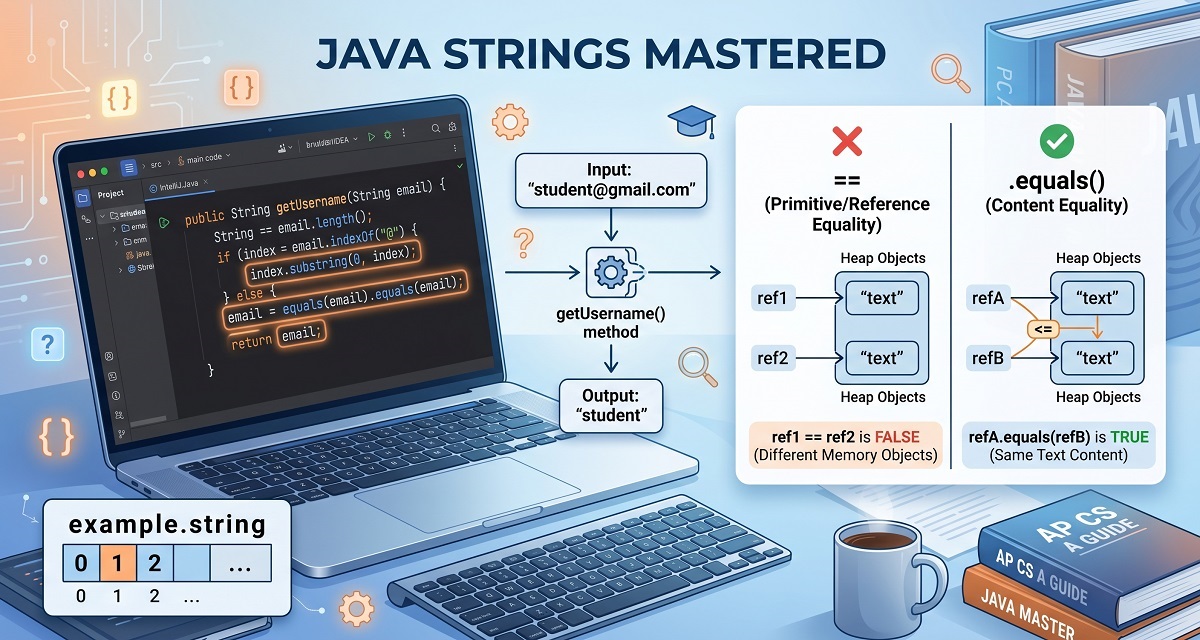
Why .equals() Is Better Than ==
One of the next concepts students usually encounter is comparing Strings.
Many beginners write:
if(name=="Ahmed")
Although this sometimes appears to work, it compares object references rather than the text itself.
The correct approach is:
if(name.equals("Ahmed"))
The .equals() method compares the contents of two Strings.
Example:
String password="Java123";

if(password.equals("Java123"))
{
    System.out.println("Correct");
}
Understanding this difference is essential because AP Computer Science A frequently tests String comparisons.
Creating Reusable Methods
Rather than writing the same code repeatedly, Java encourages programmers to place common tasks inside methods.
During the lesson we created a method called:
getUsername()
Instead of printing the username directly, the method returns it.
public static String getUsername(String email)
{
    int position=email.indexOf("@");

    return email.substring(0,position);
}
Now the same method works for:
[email protected]

[email protected]

[email protected]

[email protected]
This is much better than hardcoding character positions.
Students also begin thinking like software engineers by writing reusable code.
Practice Exercises from the Lesson
To reinforce these concepts, students completed several programming exercises.
Exercise 1
Find the length of:
Computer Science
Exercise 2
Use indexOf() to find:
'a'
inside
Programming
Exercise 3
Extract:
Science
from
Computer Science
using substring().
Exercise 4
Write a method that receives an email address and returns only the username.
Example
Input

[email protected]

Output

student
Exercise 5
Write a method that compares two usernames using .equals() and returns true if they match.
Common AP CSA Mistakes
During tutoring sessions I regularly see students making the same errors.
Avoid these mistakes:
- Starting indexing at 1
- Forgetting spaces count as characters
- Including the ending index in
substring() - Ignoring the
-1result fromindexOf() - Using
==instead of.equals() - Printing values instead of returning them from methods
- Hardcoding String positions
Correcting these habits early makes later topics much easier.
Practical Takeaways
After this lesson, students should be comfortable:
- Finding the length of a String
- Searching with
indexOf() - Extracting text using
substring() - Comparing Strings using
.equals() - Writing reusable methods
- Returning values instead of printing them
- Solving real AP CSA programming problems
These are foundational skills that appear repeatedly throughout the AP Computer Science A course.
📺 Watch the Full Lesson
Watch a complete AP Computer Science A tutoring session where we explain String indexing, length(), indexOf(), substring(), .equals(), and build reusable Java methods.
🎥 Lesson Recording
📊 Download the Presentation Slides
Follow along with the annotated slides and Java coding examples.
📄 Presentation Slides
Conclusion
Java String methods form the backbone of many AP Computer Science A programming questions. By mastering length(), indexOf(), substring(), and .equals(), students can confidently manipulate text, compare values correctly, and build reusable methods for larger programming problems.
The real strength of this lesson wasn't simply learning individual methods—it was understanding how they work together. Building a getUsername() method demonstrated how a few simple String operations can solve a practical problem while reinforcing good software engineering practices.
Whether you're preparing for the AP CSA exam or strengthening your Java fundamentals, consistent practice with these methods will make future topics such as arrays, classes, and object-oriented programming much easier to master.
Author Bio
Ahmed Elmalla is a Computer Science educator, Certified Cambridge International AS & A Level Computer Science (9618) teacher, and software engineer with over 20 years of teaching, software engineering, and international tutoring experience. He specializes in AP Computer Science A (Java) and Cambridge IGCSE (0478) and AS & A Level Computer Science (9618), helping students build strong programming, computational thinking, and exam-solving skills. Through his Learn with Kemo platform, he has mentored students from around the world using practical, exam-focused instruction tailored to each learner's needs. His lessons combine real-world software engineering experience with personalized one-to-one tutoring, making complex Java and Computer Science concepts easier to understand. Ahmed is passionate about helping students gain confidence, improve academic performance, and achieve outstanding results in international Computer Science examinations.
LinkedIn: https://www.linkedin.com/in/akelmalla
WhatsApp: https://wa.me/60194028484
.png)
.png)
.png)
1.png)