Java String Methods Explained for AP Computer Science A: length(), indexOf(), substring() with Real Examples
Java String Methods Explained for AP Computer Science A: length(), indexOf(), substring() with Real Examples
If you're preparing for the AP Computer Science A (AP CSA) exam, sooner or later you'll encounter Java String methods. Although they look simple, many students lose marks because they misunderstand how string indexing works or forget that the ending index in substring() is not included.
During one of my recent AP Computer Science A tutoring sessions, we spent over an hour exploring how Java handles strings, character positions, and common string methods. Rather than memorizing syntax, we focused on understanding why each method behaves the way it does. That approach helps students solve unfamiliar exam questions with confidence.
In this article, I'll explain the key Java String methods every AP CSA student should know, share practical examples from the lesson, and demonstrate how these concepts come together in a useful programming exercise: extracting a username from an email address.
Why Java Strings Matter in AP Computer Science A
Strings appear throughout the AP CSA curriculum. They are used in multiple-choice questions, free-response questions (FRQs), and class design problems. Students are expected to manipulate text, search for characters, extract parts of strings, and combine multiple values into meaningful output.
Many beginners treat strings like primitive data types, but Java treats a String as an object. That means Strings come with built-in methods that allow us to analyze and manipulate text without writing everything from scratch.
Understanding these methods also strengthens your knowledge of object-oriented programming because every String object has behaviors (methods) you can call.
Understanding String Indexing
One of the first concepts we reviewed during the tutoring session was indexing.
Every character inside a Java String has a position.
The important rule is:
Java starts counting from zero.
For example:
Programming
| Character | P | r | o | g | r | a | m | m | i | n | g |
|---|---|---|---|---|---|---|---|---|---|---|---|
| Index | 0 | 1 | 2 | 3 | 4 | 5 | 6 | 7 | 8 | 9 | 10 |
Students often assume the first character is position 1, which immediately causes errors when using charAt(), substring(), or indexOf().
Remember:
- First character = index 0
- Last character = length − 1
This simple rule appears repeatedly in AP CSA exam questions.
Java String Methods Every AP CSA Student Should Know
1. length()
The length() method returns the total number of characters inside a String.
String s = "Programming";

System.out.println(s.length());
Output
11
Notice that spaces count as characters too.
Hello World
contains 11 characters, not 10.
2. indexOf()
indexOf() searches for a character or word.
Example:
String s="Programming";

System.out.println(s.indexOf("g"));
Output
3
Java returns the first matching index.
Searching for something that doesn't exist returns:
-1
This is an extremely important value because it tells your program that the search failed.
3. substring()
substring() extracts part of a String.
Example
String word="Programming";

System.out.println(word.substring(3,7));
Output
gram
The biggest mistake students make is forgetting that the ending index is exclusive.
Java includes:
3
4
5
6
but not
7
Building a Username Extractor
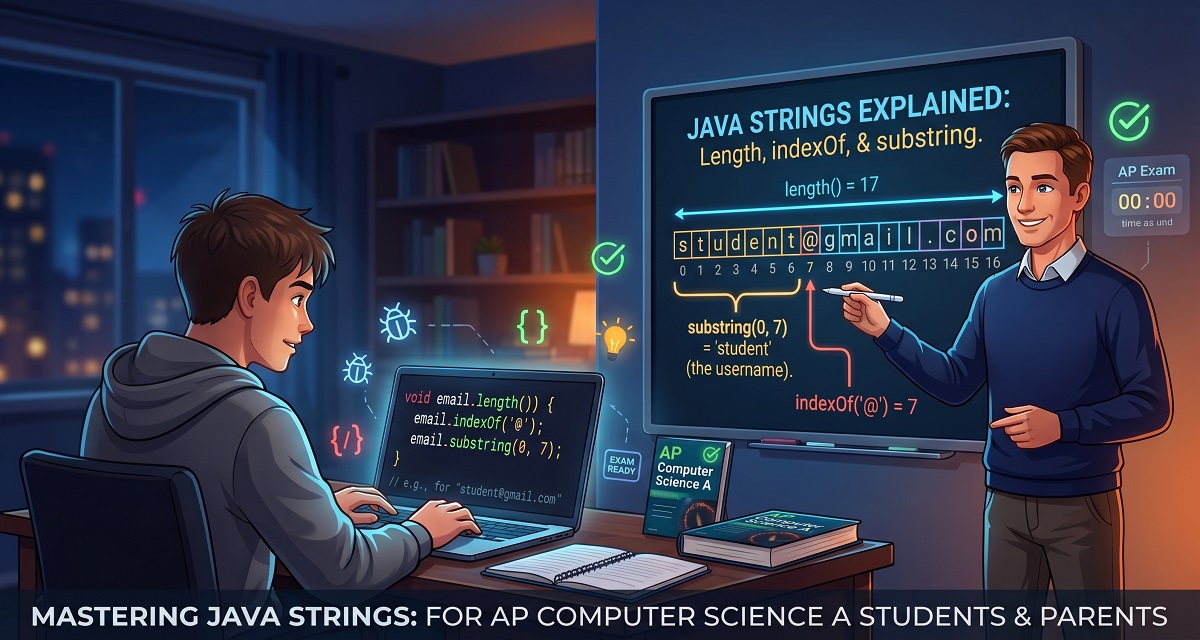
The highlight of the tutoring session was creating a method that extracts the username from an email address.
For example
[email protected]
should become
student
The beginner solution works by manually entering the position of the @ symbol.
A better solution is to let Java find the position automatically.
public static String getUsername(String email)
{
    int position=email.indexOf("@");

    return email.substring(0,position);
}
Now the method works for almost any email address.
[email protected]

[email protected]

[email protected]
This introduces students to writing reusable methods rather than hardcoding values.
Common Mistakes Students Make
Throughout the lesson we corrected several common errors:
- Assuming indexing starts at 1
- Forgetting spaces count as characters
- Using an incorrect ending index in
substring() - Forgetting that
indexOf()returns-1when nothing is found - Printing results instead of returning them from methods
- Hardcoding positions instead of using
indexOf()
Avoiding these mistakes can significantly improve performance in both AP CSA coursework and exams.
Practical Takeaways
If you're studying Java for AP Computer Science A, practice these skills until they become second nature:
- Find the length of a String.
- Locate characters using
indexOf(). - Extract text using
substring(). - Combine multiple String methods in a single solution.
- Build reusable methods instead of hardcoding values.
The more examples you write, the easier FRQ questions become.
📺 Watch the Full Lesson
See these concepts explained step by step during a real AP Computer Science A tutoring session.
🎥 Lesson Recording
📊 Download the Presentation Slides
Follow the examples from the lesson with annotated slides and coding exercises.
📄 Presentation Slides
💻 Practice Resources
- CodingBat Java: https://codingbat.com/java
- CS Awesome: https://runestone.academy/ns/books/published/csawesome/index.html
- Oracle String Documentation: https://docs.oracle.com/en/java/
Conclusion
Java Strings are one of the most frequently tested topics in AP Computer Science A. While methods like length(), indexOf(), and substring() appear simple, mastering them requires understanding indexing, return values, and how multiple methods can work together to solve real problems.
During this tutoring session, we moved beyond memorizing syntax by building a practical username extractor that demonstrates reusable programming techniques. These are exactly the kinds of skills students need for both classroom success and the AP CSA exam.
Consistent practice with small coding exercises will make String manipulation feel natural and prepare you for more advanced Java topics later in the course.
Author Bio
Ahmed Elmalla is a Computer Science educator, Certified Cambridge International AS & A Level Computer Science (9618) teacher, and software engineer with over 20 years of teaching, software engineering, and international tutoring experience. He specializes in AP Computer Science A (Java) and Cambridge IGCSE (0478) and AS & A Level Computer Science (9618), helping students build strong programming, computational thinking, and exam-solving skills. Through his Learn with Kemo platform, he has mentored students from around the world using practical, exam-focused instruction tailored to each learner's needs. His lessons combine real-world software engineering experience with personalized one-to-one tutoring, making complex Java and Computer Science concepts easier to understand. Ahmed is passionate about helping students gain confidence, improve academic performance, and achieve outstanding results in international Computer Science examinations.
LinkedIn: https://www.linkedin.com/in/akelmalla
WhatsApp: https://wa.me/60194028484


.png)
.png)